Ignoring iSis Barcode Automation
CC Capture supports iSis barcodes to automatically upload the measurement to the desired print track with no operator intervention. If the bar code is no longer accurate to the print track (last minute change and color target was printed to a different print condition), then the user can manually override the bar code and manually select the correct print track, but the operator must do two things:
- Operator has to choose a different template (same patch layout but without bar code definition). There has to be two templates available for the operator (one used when bar code is desired, and one to use when bar code is not desired), they should be labeled to be obvious (ie "CC84," vs "CC84 ignore bar code")
- Next, the Operator needs to manually select the actual printer and track that created the print.
By doing this, the measurement will be sent to the correct print track.
The Color Champion needs to create a new version of the existing scanning template (one that will ignore the bar code instructions) within the Expert login using the Capture Inspector tool. The new template will be configured to be "Native", not the "Chart info."
Additionally, one parameter: "E — Distance to First Line" has to be edited to accommodate the ignoring of the bar code. The "E" value that defines the distance between the black bar and the first row of patches.
The Expert needs to increase the E value using the formula: (50% of Patch Height [mm]) + 23mm
Example: If Patch Height = 6 mm, then E = 3+23 = 26
How to:
Go to Scanning Templates in Capture Inspector within the ISIS instrument category and record the control strip and the patch width and height of the existing scanning template that your workflow is using. Then exit out of the scanning template without saving.
Next Create a New Scanning Template by clicking on the green plus sign: Be sure to enter the name with wording that makes it obvious that ISIS will ignore bar code.
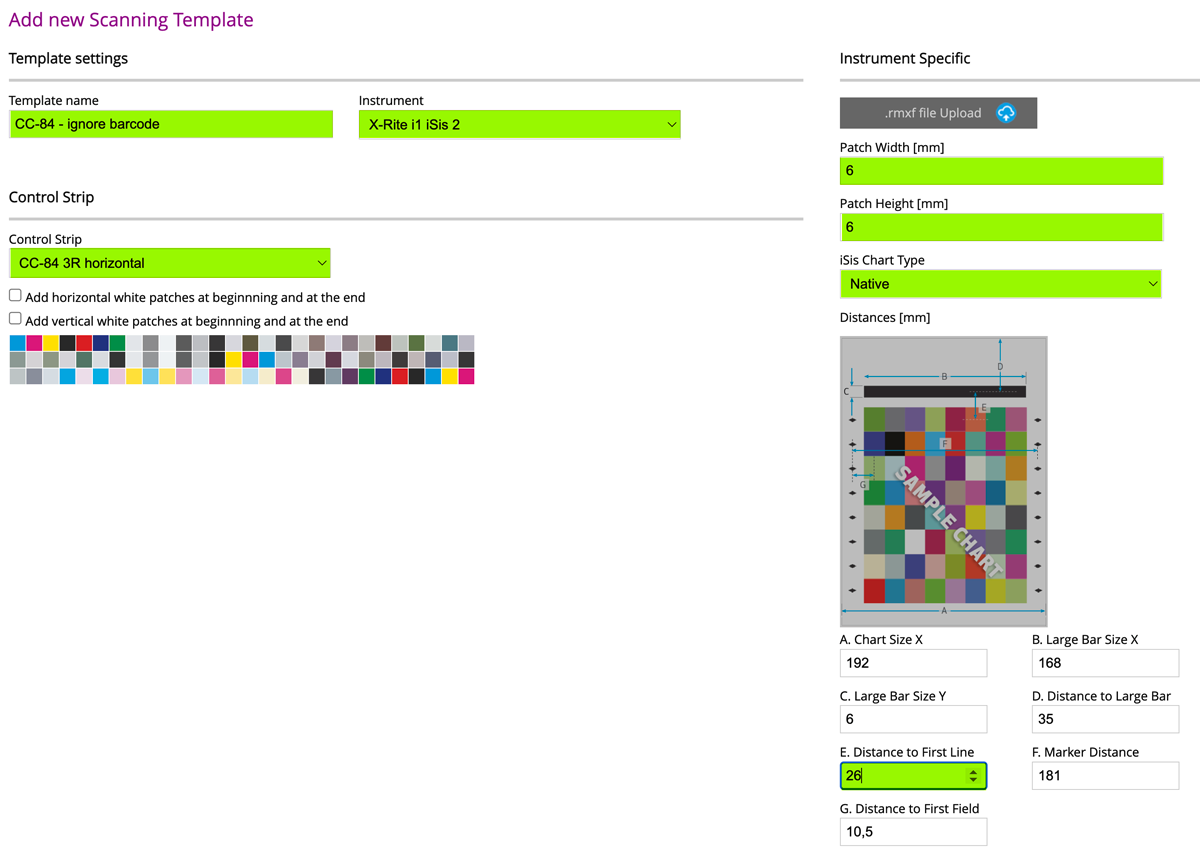
- Name template with a name which helps to describe the purpose of this template: CC84 Ignore barcode
- Select the correct ISIS instrument, the correct Control Strip, and enter correct Patch height and width, and select ISIS Chart Type to be: Native
- The system should properly calculate all numbers using default values, except
E — Distance to First Line" which is set for the non-barcode version — in the above example the original E value was 13 and has to be modified to a new value of 26 based on formula (50% of 6-patch height + 23) - Save Scanning Template and test with CC Capture. If any problems occur, measure the E dimension with a ruler and ensure all other dimensions of physical target equal the values defined in the configuration.
Video
-
This tutorial covers the use of Chromachecker Capture to operate an x-Rite iSis spectrophotometer.
-
This tutorial shows how to use a barcode to automatically select the print condition and printing device that was used to produce the output being read by the iSis spectrophotometer. This automates the process of a quality check to simply placing the leading edge of the output in the iSis instrument to start the identification of the file and scanning of the control strip.
-
This tutorial provides an overview of how to perform a mechanical check for the iSis spectrophotometer scanner. By using Instrument Inspector you can confirm that the iSis is performing within the specification of the device. If you receive a fail at any time, it is a best practice to review this basic maintanence.
Contact ChromaChecker Support
Additional information and Support Form is available for logged users.
