Sample: Corporate Spots Library
We have prepared a sample Color Library CxF that contains eight spot colors. Measured color samples come from PVC film samplers. The library has been measured using i1Pro3 driven by CC Capture, data are spectrally captured at M0, M1, and M2. Click to download the CxF file below.
 |
Corporate Spots.CxF |
1. Import Color Library into Color Inspector Assets
Import the downloaded file into ChromaChecker and use learn what you can do with it. The first step is to create a new library. In Color Inspector select the Assets tab, then click on:
 Add New
At this stage, the user can simply drag-n-drop file
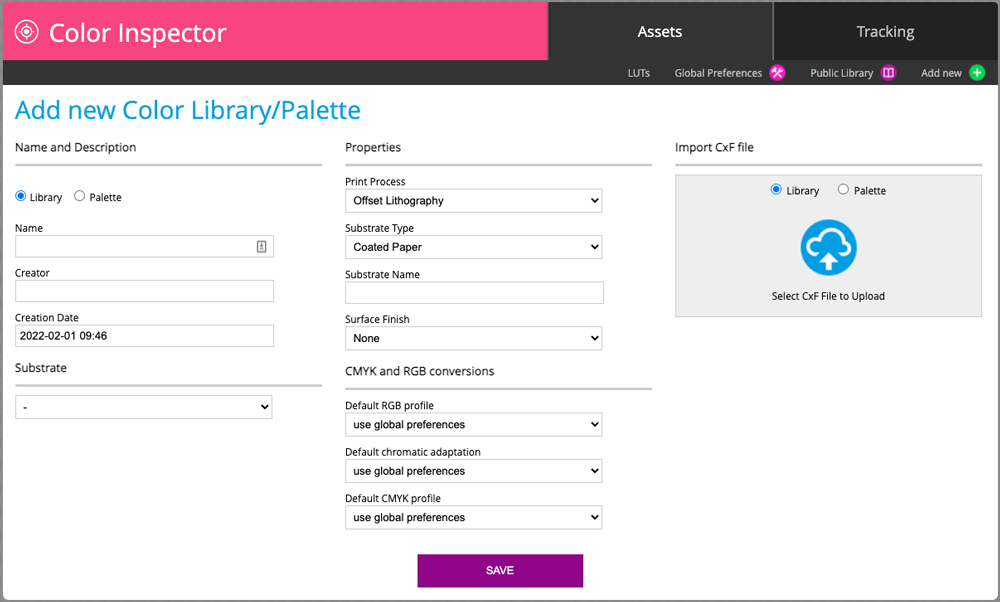
Ones imported the user may see its content:
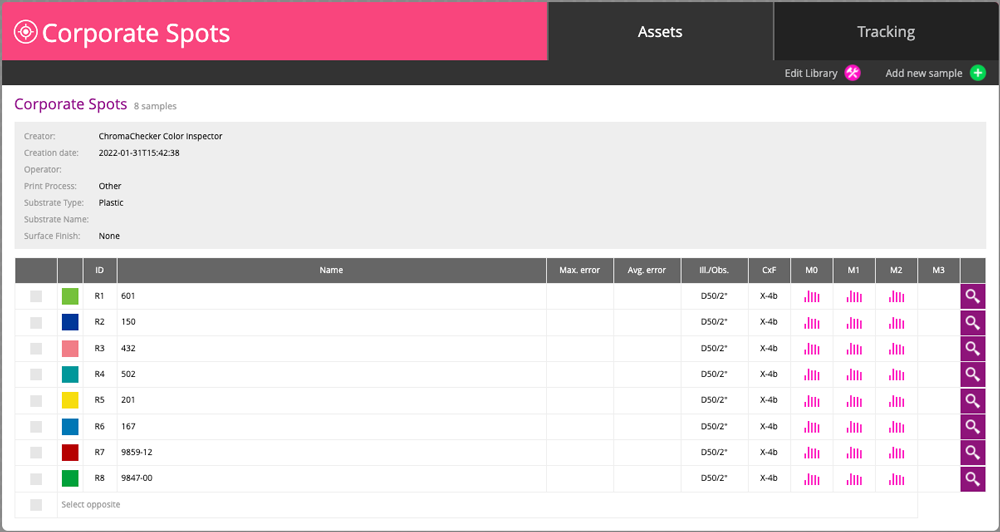
We can see a list of all eight color samples. Pink ikons inform that colors have specific tolerances defined for each color and for all M-conditions. Clicking on magnifying glass we have access to a detailed sample report.
Example of reports that we can perform on a whole library
- Virtual Spot Process Print (CMYK, ECG)
- Virtual Spot RGB "Print"
- Display evaluation
- Custom Lighting evaluation
Do you have X-Rite eXact? Upload CxF into your instrument
Launch X-Rite eXact Manager, connect your instrument and upload Corporate Spots to your eXact. Now you can access this library directly.
Related Topics
Contact ChromaChecker Support
Additional information and Support Form is available for logged users.
