Security and Platform Documentation
Security and platform documentation
Security Overview (architecture, data handling, authentication, hosting):
https://chromachecker.com/manuals/en/show/security
Privacy and GDPR information:
https://chromachecker.com/manuals/en/show/privacy_policy_25
https://chromachecker.com/manuals/en/show/gdrp_2025
Data flow, protocols, and connectivity
ChromaChecker operates as a cloud-based SaaS platform with optional local client software (CC Capture / Uploader).
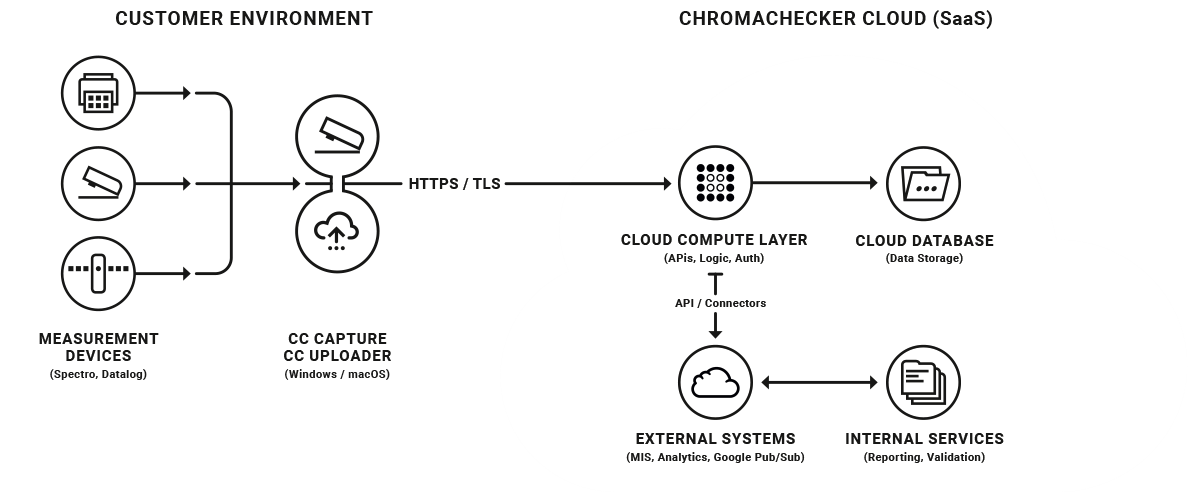
Typical data flow: (see attached diagram below)
- Measurement data is captured locally from spectrophotometers or environmental data loggers.
- The local client (CC Capture / Uploader) securely transmits measurement data to the ChromaChecker cloud.
- Data is processed and stored in the cloud platform and accessed through the web interface or APIs.
Network and protocol details
- Communication protocol: HTTPS
- Encryption: TLS
- Required network access: outbound HTTPS (TCP port 443)
The platform requires only outbound HTTPS (TCP 443) connections initiated from the customer environment. Responses from the cloud occur within the same HTTPS session.
No inbound firewall rules are required.
In some corporate environments, endpoint security or proxy policies may require the CC Capture or CC Uploader applications to be explicitly allowed to establish outbound HTTPS connections.
If outbound traffic is restricted by proxy or domain filtering policies, outbound HTTPS access to the following domain should be allowed:
Optional functionality
Outbound SMTP submission (TCP port 587) may be used by the CC Capture application when a user submits a technical support request directly from the application. In this case, the workstation sends an email to the ChromaChecker support team that may include application log files to assist troubleshooting.
If outbound SMTP traffic is restricted by the customer network, this support request feature may not work, but it does not affect the operation of the ChromaChecker platform.
Architecture overview
The platform consists of three main components:
- Local client layer (CC Capture / Uploader on Windows or macOS)
- Cloud application services (SaaS platform)
- Cloud data storage layer
All communication between these components occurs over encrypted HTTPS connections.
Platform documentation
ChromaChecker Platform Manual:
https://chromachecker.com/page/en/show/manual
CC Capture system requirements:
https://chromachecker.com/manuals/en/show/hardware_requirements
Implementation planning guide:
https://chromachecker.com/manuals/en/show/how_to_implement_cc
For additional technical clarification regarding architecture, integrations, or APIs please us the form below to contact Support.
Video
-
This tutorial demonstrates how to configure ChromaChecker Uploader to use ChromaChecker Print Inspector for analysis
-
How to configure ChromaChecker to use Capture for scanning a control strip to assess measurement data from your printer.
-
The main features of the ChromaChecker platform in a quick overview of the benefits for users of our system - both dealing with color reproduction and recipients.
Contact ChromaChecker Support
Additional information and Support Form is available for logged users.
