June 26, 2026
X-Rite i1 iO
- Supported instruments: i1iO 1, 2, 3
- Modes: Spot, Scan
- M-Condition supported: M0, M1, M2 (depending on the instrument)
- Inspectors: Print, Instrument, Color, Substrate
Features / unique benefits:
- Autoscan/spot selection. The instrument will adjust the speed of scanning or if require switching to spot mode automatically - no user intervention is required
- Bar-code support for Scanning Template selection and description.
- Extended scanning area- CC Backer extend the real measurement area by 30%
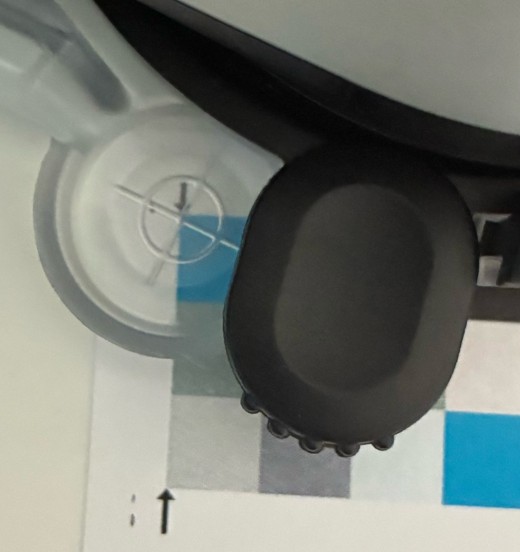
- Corner-based / crosshair positioning definition brings more accurate results.
- Stored positioning for instant measurements.
- Motorized Positioning for accurate definition - instrument will show current positioning. When the origin of the first corner is defined - The instrument will predict the next corner locations. The user may adjust the position
- Keyboard control for accurate positioning - the user may define positioning using keyboard arrows - single click - single step of step-motor.
- Positioning can be temporarily remembered - enables fast rescan even when scanning template doesn’t contain coordinates.
- The user may read the real position of the cross-hair (if manual editing is required)
- VCS: Virtual Control-Strip - spot mode measurement for any location on the sheet - The user may define virtual control-strip - a list of coordinates where the instrument has to go and measure. A list may contain dozen of locations. A control strip definition is required to list reference values. A CMYK, Hi-Fi, RGB, Spot, Lab and Special patches can be mixed.
- Learning mode for VCS - the user may teach instrument where are all point that Instrument should measure
Recommendations:
- Track your instrument with Instrument Inspector Target frequently.
- ChromaChecker Backer for iO is strongly recommended - Errors caused by improper backing might be more than ∆E00=2 (Standard Proofing Paper)
- The Calibration Standard (white plaque), as well as the optical path, have to be cleaned
- Launch X-Rite i1Diagnostic (free utility) to check Instrument and lamp restore procedure at least semi-yearly.
- Make sure that your USB socket delivers enough power and you are using a high-quality connection cable.
- Be sure that environmental conditions (RHT) are in the recommended range.
- Maintain the glittering ring - replace it when used
Proper Selection of Target Corners
The positioning of the target is selected by identifying the corner of the patch. This is a major improvement for the i1i0 as it is most precise and eliminates errors with the location of the patches when using other software modules. This is unique to Chromachecker.
Video
-
This tutorial shows the simple operation of the i1i0 table using Chromachecker Capture software. The control strip consists of 18 spot colors and the G7 patches to iterate a G7 curve directly out of Capture. This creates a simple and automated process for operators to perform a quality check on G7, process colors and spot colors.
Related Topics
Contact ChromaChecker Support
Additional information and Support Form is available for logged users.
